Category Archives: Security

Email Is Still the Easiest Way Into Your Business | IT Pro Tech

Email Is Still The Easiest Way Into Your Business

Most cyberattacks don’t start with someone breaking through a firewall. They start with one email. A fake invoice, a delivery notice, a password reset, or a message pretending to be from Microsoft can be enough to trick someone into clicking the wrong link. According to the Australian Cyber Security Centre (ACSC), email remains the number one delivery method for cyberattacks on Australian businesses.

For small businesses, email security is one of the most critical parts of any cybersecurity strategy.

Why This Matters for Your Business

One unsafe email can lead to stolen passwords, fake payment requests, compromised mailboxes, or malware: harmful software designed to damage systems or steal data. Attackers are also increasingly using Business Email Compromise (BEC), where they gain access to a legitimate email account and use it to impersonate staff, redirect payments, or target your customers directly. Once inside, the damage can spread fast and quietly.

How Microsoft 365 Security Helps

With the right setup, Microsoft 365 email security and Microsoft Defender for Business can protect your business by:

Here’s what you get:

  • Scanning emails for suspicious links and attachments before they reach your team
  • Blocking phishing emails and Business Email Compromise attempts automatically
  • Protecting laptops and devices if something does get through
  • Alerting your IT team when unusual account activity is detected
  • Helping stop malware and ransomware from spreading across your network

One important thing to know: Microsoft Defender for Business is not the same as Windows Defender. It is business-grade protection for your company devices, included with Microsoft 365 Business Premium, and it needs to be properly configured to work effectively.

The Business Impact

A single email attack can cause days of downtime, direct financial loss, and legal obligations under the Australian Privacy Act and the Notifiable Data Breaches (NDB) scheme if customer data is involved.

Penalties for failing to report a breach can be significant. Proper email security and inbox protection reduces that risk before it becomes an expensive problem.

Ready to Secure Your Emails and Devices?

If you’re not confident about your email security, now’s a good time to check.

Get in touch today to find out how we can help set up Microsoft 365 Defender and protect your company data on every device.

👉 Contact Our IT Support Team Today

Give us a call for expert advice and reliable IT security solutions.

📞 Call us now on 02 9387 3888

Not sure how this impacts you?

We're ready to help!

Chat to one of our friendly experts today.

Your Name(Required)

Is Your Business Data Protected If a Laptop Goes Missing? | IT Pro Tech

Is Your Business Data Protected If a Laptop goes missing?


Laptops get left on public transport. Bags can get stolen. It happens more than you’d think, and when it does, the question isn’t just about replacing the device. It’s about who now has access to everything on it: client records, financial data, emails, and passwords. Without the right protection in place, a stolen laptop is like an open book.

Why this matters for your business

Most businesses focus on antivirus software and strong passwords, but these do nothing to protect data if someone physically removes a hard drive or boots a machine from a USB stick. Unencrypted devices can be cracked in minutes and, once that happens, your data is fully exposed. Depending on your industry, a breach like this can trigger regulatory fines, client notification obligations, and serious reputational damage.

What Can Go Wrong Without Mobile Device Management?

When staff access company emails, files, or apps on their phones, there’s little stopping them from accidentally or intentionally copying, saving, backing up or screenshotting sensitive company information. A forwarded document or captured screen can lead to a data breach, compliance issues, or worse.

How BitLocker solves this

Microsoft BitLocker is a built-in encryption tool available on Windows 10 and 11 Pro with no extra software to buy. When enabled, it scrambles everything on the drive so it’s completely unreadable without the correct login credentials. In practice:

    • A stolen laptop is useless to a thief because the data is locked and unreadable
    • Encryption happens silently in the background and not noticeable to staff
    • Recovery keys are stored securely so your IT team can always regain access if needed
    • It works on laptops, desktops, and external drives

The business impact

Under frameworks like the Australian Privacy Act and various industry standards, you are expected to take reasonable steps to protect sensitive data. Drive encryption is one of the most straightforward ways to achieve that. If the worst happens, having devices encrypted can be the difference between a manageable incident and a costly, public one.

Ready to Secure Your Business?

At IT Pro Tech, we offer secure, best practice IT solutions for your business.

We can roll out BitLocker across your whole team quickly and without any disruption to your day. 

Get in touch today and we’ll take care of it.

👉 Contact Our IT Support Team Today

Give us a call for expert advice and reliable IT security solutions.

📞 Call us now on 02 9387 3888

Not sure how this impacts you?

We're ready to help!

Chat to one of our friendly experts today.

Your Name(Required)

Protecting Company Data on Staff Personal Mobile Devices | IT Pro Tech

Protecting Company Data on Staff Mobile Devices


With employees working on personal smartphones and tablets, keeping sensitive company data secure has never been more important. Using personal and mobile devices to access company data creates many risks.

What’s the good news?

Microsoft Intune MAM (Mobile Application Management) gives your business the tools to stay in control, by reducing risk to company data on personal mobile devices.

What Can Go Wrong Without Mobile Device Management?

When staff access company emails, files, or apps on their phones, there’s little stopping them from accidentally or intentionally copying, saving, backing up or screenshotting sensitive company information. A forwarded document or captured screen can lead to a data breach, compliance issues, or worse.

How Intune MAM Puts You Back in Control

Microsoft Intune allows your IT team to apply specific rules directly to company apps and data on any device:

    • Block copy and paste from company apps into personal apps.
    • Prevent screenshots of sensitive screens within company apps
    • Block company file downloads so they can’t be saved to personal storage
    • Block sharing of company data to personal email or apps like WhatsApp
    • Remotely wipe company data from a device if it’s lost, stolen, or an employee leaves the business

These controls apply to any personal mobile or tablet devices your staff bring to work. MAM only controls the company data on the devices and personal information is not accessible by the Intune administrators.

Why This Matters for Your Business

Data protection regulations like the Australian Privacy Act mean you have a legal responsibility to protect the information you hold. A mobile security policy backed by Intune MAM helps you meet those obligations while giving your team the flexibility to work from anywhere.

Ready to Secure Your Business?

Implementing Intune MAM doesn’t have to be complicated.

Our team at IT Pro Tech handles the setup, configuration, and ongoing management, so you stay protected without the headache.

Get in touch today to find out how we can protect your company data on every device

👉 Contact Our IT Support Team Today

Give us a call for expert advice and reliable IT security solutions.

📞 Call us now on 02 9387 3888

Not sure how this impacts you?

We're ready to help!

Chat to one of our friendly experts today.

Your Name(Required)

Why Email Security Matters For Your Business | IT Pro Tech

Why Email Security Matters For Your Business


Email account breaches are one of the most common ways cyber criminals target businesses

If your email accounts are not properly secured, hackers can access sensitive information, send fake emails from your address, and trick staff or customers into sharing important details.

For businesses of all sizes, email security is not optional.

A secure email system helps protect your data, your reputation, and your customers. It also reduces the risk of phishing attacks, malware, and business email compromise, which can lead to costly downtime and financial loss. 

Does Your Business Have the Following Security Measures in Place?

    • Multi-factor authentication
    • Strong password policies
    • Email encryption for sensitive messages
    • Spam and phishing filters
    • Staff awareness training

These layers of protection make it much harder for attackers to gain access to your inboxes. 

Protect Your Business Today 

If your business relies on email, securing it should be a top priority.

At IT Pro Tech, we can help set up secure email services, reduce cyber risk, and keep your business communication safe. 

Need help securing your business email?

👉 Contact Our IT Support Team Today

Give us a call for expert advice and reliable email security solutions.

📞 Call us now on 02 9387 3888

Not sure how this impacts you?

We're ready to help!

Chat to one of our friendly experts today.

Your Name(Required)

Is Your Business IT Cabinet a Mess? | IT Pro Tech

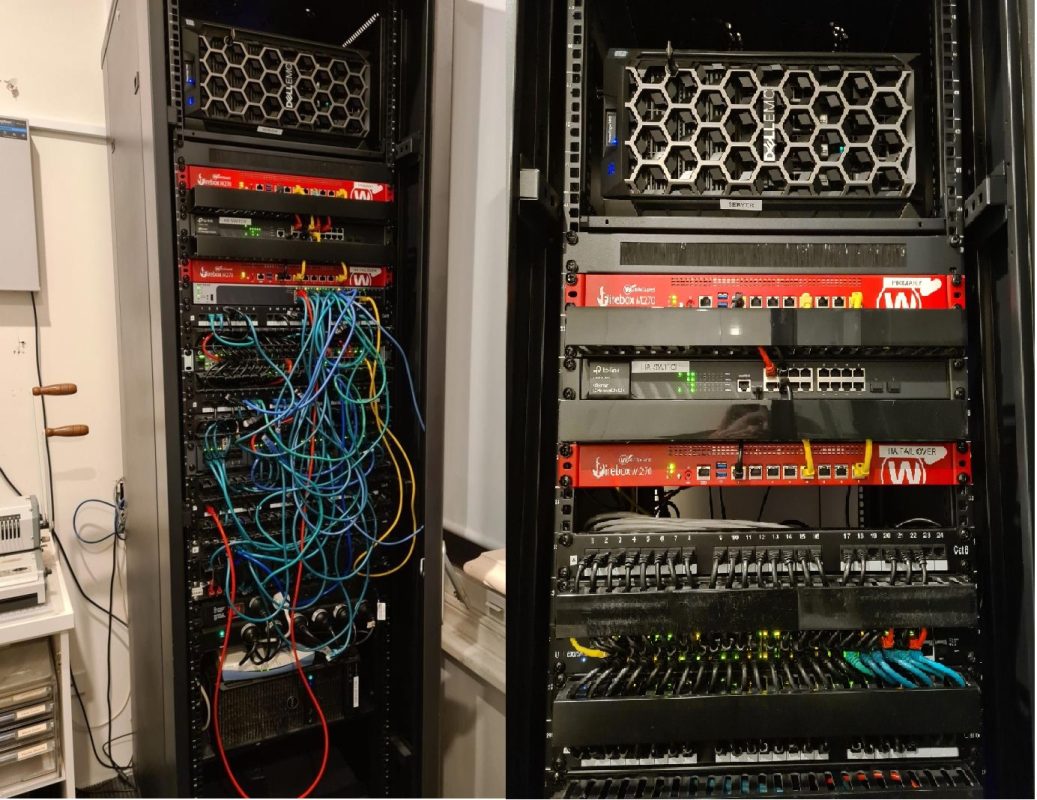
Network cabinet organised

Is Your Business IT Cabinet a Mess? Here’s Why a Tidy Network Infrastructure Matters


Does your server room look more like a plate of spaghetti than a secure IT setup?

Messy, unorganised network cabinets aren’t just hard to look at. They can slow down your business, make troubleshooting a nightmare, and create unnecessary cybersecurity risks.

At IT Pro Tech, we specialise in transforming chaotic IT setups into clean, efficient, and secure business IT infrastructure.


Why Organised Network Infrastructure Is Essential

When your IT environment is properly structured and well-maintained, your business benefits from:

  • ✅ Faster and easier troubleshooting
  • ✅ Improved airflow and device performance
  • ✅ Reduced risk of accidental unplugging or equipment failure
  • ✅ Enhanced cybersecurity and physical security
  • ✅ Professional appearance for audits or client visits

A clean network cabinet isn’t just about aesthetics. It’s a sign of a secure and well-managed IT environment.


Structured Cabling and IT Rack Management Services

Our team provides expert solutions in:

  • Structured cabling and cable management
  • Network cabinet clean-ups and reorganisation
  • Server rack design and installation
  • Secure equipment mounting and lockable enclosures

Whether you’re a small office or a multi-site operation, we help streamline your IT infrastructure for peak efficiency and maximum uptime.


Is Your IT Cabinet Slowing Down Your Business?
Disorganised network cabinets and poor cabling can lead to downtime, inefficiency, and security issues.

Don’t let IT challenges slow you down. Whether it’s a one-time fix or a complex project, IT Pro Tech is ready to assist.

👉 Need Help with an IT Project or Issue?

Talk to a Cybersecurity Specialist Today

Protect your identity and business from emerging cyber-threats.

📞 Call us now on 02 9387 3888

Not sure how this impacts you?

We're ready to help!

Chat to one of our friendly experts today.

Your Name(Required)

Increasing Cyber Threats to Digital Businesses: What Every Australian Company Needs to Know

Cybersecurity | IT support

Increasing Cyber Threats to Digital Businesses: What Every Australian Company Needs to Know


Australia’s rapid digital transformation has unlocked new opportunities. But it has also opened the door to escalating cyber threats. According to KPMG, nearly two-thirds of Australian businesses have fast-tracked their digital strategies since the pandemic, increasing reliance on cloud platforms, digital workflows, and remote work infrastructure.

But with progress comes risk. As businesses digitise, cybercriminals are becoming more sophisticated, targeting digital operations, customer data, and business continuity.


Top Cybersecurity Challenges Facing Digital Businesses

KPMG highlights five digital business priorities that directly impact cybersecurity resilience:

  1. Integrate systems across front, middle, and back-office functions
  2. Streamline customer digital experiences
  3. Enhance supplier and service provider connections
  4. Develop internal and external tech talent pipelines
  5. Improve agility and business continuity using digital solutions

These transformations must be secured against emerging and advanced cyber threats.


The Rise of Cyber Attacks in Australia

Increased digital adoption has made Australian businesses more vulnerable to:

  • Data breaches
  • Phishing attacks
  • Ransomware
  • Social engineering scams

Cybercriminals often target personally identifiable information (PII), customer data, financial records, and behavioural insights (e.g. facial recognition, geolocation, contact tracing). Once inside your systems, attackers can dwell undetected for weeks, causing extensive damage before you even realise it.

🚨 Important: If your business suffers a cyber-attack, immediately report it to the relevant authorities and engage cybersecurity professionals.


New & Emerging Network Security Threats

Cybercrime is increasingly globally with less than 10% of attacks originate from within Australia. Key emerging threats include:

  1. IoT Device Exploits

Smart devices like vehicles, sensors, and appliances can be hacked if they’re not properly secured. Infected IoT systems can become part of a botnet or even a hivenet, networks of compromised devices that autonomously coordinate attacks like DDoS, data theft, or ransomware.

  1. Business Email Compromise (BEC)

Hackers impersonate executives or partners to trick staff into sending money or sensitive data. Always verify unusual email requests especially those involving finance or passwords.

  1. Spyware & Zero-Click Malware

Tools like Pegasus spyware can infect smartphones without user interaction, turning your device into a 24/7 surveillance tool. These “zero-click” attacks exploit vulnerabilities in iOS and Android systems, making device security more critical than ever.


Strengthen Your Cyber Hygiene

Human error is responsible for over 90% of successful cyber-attacks. Follow these steps to improve your organisation’s cyber hygiene:

  • Regularly back up data
  • Encrypt sensitive files and emails
  • Use multi-factor authentication (MFA)
  • Replace weak passwords with strong passphrases
  • Install security software on all devices
  • Audit and monitor who accesses business systems

✅ Use the Australian Cyber Security Assessment Tool to evaluate your organisation’s risk level.


Implement a Cybersecurity Strategy for Business Continuity

Your cybersecurity approach should include:

  • Clear IT security policies
  • Defined roles and responsibilities
  • Ongoing cybersecurity training
  • An incident response plan for ransomware or data breaches

Small-to-medium-sized businesses (SMEs) are frequent targets, often due to limited internal security resources. Alarmingly, 80% of breached SMEs shut down within 12 months. Consider joining a collective cyber defence initiative, where SMBs pool resources and access real-time threat intelligence from cybersecurity specialists.


Cybersecurity Insurance: A Vital Layer of Protection

Cyber insurance can help cover:

  • Legal and regulatory costs
  • Incident response and investigation fees
  • Customer communication and public relations
  • Data recovery and compensation
  • Business interruption losses

Some policies offer access to 24/7 cyber support teams and consultation. With policy complexity growing, IT Pro Tech can help guide you with the right protocols to ensure you are covered by your policy.


Need Help with an IT Project or Issue?

Australian companies are facing more cyber-attacks than ever, from ransomware to data breaches. Is your business truly secure?

Managing IT in-house can drain time and resources. With IT Pro Tech’s Managed IT Services, you get expert support, 24/7 monitoring, and security management—all tailored to your business needs.

👉 Contact us today to discuss a tailored Managed IT Services plan

Talk to a Cybersecurity Specialist Today

Protect your identity and business from emerging cyber-threats.


📞 Call us now on 02 9387 3888


Not sure how this impacts you?

We're ready to help!

Chat to one of our friendly experts today.

Your Name(Required)

Should I Move My Business to the Cloud?

Cloud computing

Should I Move My Business to the Cloud?


If you’re asking, “Should my business move to the cloud?”. The answer is likely yes, but with the right plan in place.

Whether you’re running a small team or a growing enterprise, migrating to the cloud can bring substantial benefits in terms of cost savings, scalability, productivity, and security. But as with any IT shift, there are smart ways to approach it and critical security considerations to keep in mind.


Why Move to the Cloud?

Modern businesses rely on cloud computing more than ever. From email hosting to file storage to complete infrastructure-as-a-service (IaaS) solutions, cloud platforms offer unmatched flexibility and performance.

Here are just a few reasons why migrating to the cloud makes business sense:

✅ Cost-Effective for Growing Teams

Reduce capital expenditure on on-premise servers and infrastructure. With cloud services, you pay only for what you use and scale as your business grows.

✅ Access from Anywhere

Enable remote work and improve collaboration with secure access to data and applications from any location or device.

✅ Enhanced Cloud Security

Leading cloud service providers (like Microsoft Azure, AWS, and Google Cloud) offer advanced security features, including encryption, firewalls, compliance tools, and 24/7 monitoring by security experts.

✅ Better Business Continuity

Cloud systems are built for resilience and disaster recovery, helping ensure your operations continue even if local systems fail.


Is Cloud Migration Safe?

Yes, if done correctly. Cloud platforms are designed with security in mind, but your safety also depends on how you configure, manage, and secure your cloud environment.

At IT Pro Tech, we ensure that every cloud migration follows industry best practices, including:

  • End-to-end data encryption
  • Multi-factor authentication (MFA)
  • Role-based access controls (RBAC)
  • Regular security audits and compliance reviews
  • Secure cloud backups and redundancy

We tailor every migration to your business needs, providing both technical support and strategic guidance throughout the transition.


How to Migrate to the Cloud the Right Way

A full cloud migration doesn’t happen overnight. We recommend a phased approach, starting with lower-risk services (like email and file storage), followed by critical systems and applications.

Our team works closely with you to:

  • Assess your current infrastructure
  • Develop a customised cloud migration strategy
  • Ensure data integrity and minimal downtime
  • Optimise your environment for cost, performance, and security


Already Using Some Cloud Services?

Chances are you’re already leveraging cloud-based tools like Microsoft 365, Dropbox, or Google Workspace. We can help you integrate and secure these platforms under one cohesive strategy that supports your entire business.


Ready to Move to the Cloud?

Whether you’re just starting or ready for full migration, IT Pro Tech is here to help. We’re experts in cloud solutions for Australian businesses, with deep experience in both cloud security and infrastructure design.

We’re offering a complimentary IT Health & Security Check, valued at $500, to help assess your current setup and show how an MSP can support your growth.

👉 Register here for your free IT Health Check

Talk to a Cybersecurity Specialist Today

Let’s build your future in the cloud, securely and seamlessly.


📞 Call us now on 02 9387 3888

Not sure how this impacts you?

We're ready to help!

Chat to one of our friendly experts today.

Your Name(Required)

Office 365 Phishing Attacks: How Open Redirects Are Used | IT Pro Tech

Office 365 support

Office 365 Phishing Attacks: How Open Redirects Are Being Used to Steal Credentials


Is your organisation protected against the latest Microsoft 365 phishing threats?

Cybercriminals are getting more sophisticated, using trusted domains and technical tricks to make phishing emails appear legitimate, especially when targeting Office 365 credentials.

One of the latest phishing techniques involves the abuse of open redirects, what once was a legitimate web development feature that’s now being exploited to deceive users and security filters alike.


What Is an Open Redirect and Why Is It Dangerous?

An open redirect is a URL that automatically sends users from a known, trusted domain to a different destination. For example:

https://example.com/redirect.php?url=http://attacker.com

Cyber attackers use this technique to disguise malicious links, making it harder for users and email security tools to detect threats. In many cases, these phishing campaigns use familiar services like Google reCAPTCHA to create an additional layer of credibility and further hide the final malicious destination.


How Phishing Attacks Are Targeting Microsoft 365 Users

According to Microsoft security analysts, attackers are:

  • Embedding phishing URLs inside legitimate-looking links
  • Using open redirects to bypass traditional email security filters
  • Adding intermediary steps (e.g., reCAPTCHA pages) to mask final malicious pages
  • Mimicking login pages to steal Office 365 usernames and passwords

These tactics are making it harder for employees to detect phishing scams, even when they hover over links before clicking.


Why Security Awareness Training Is Essential

While hovering over links remains a useful habit, it’s no longer enough. Businesses must go further by:

  • Implementing comprehensive cybersecurity awareness training
  • Educating employees on the latest phishing tactics
  • Encouraging scepticism toward unsolicited emails, even those from trusted sources
  • Providing real-world examples during training sessions


Is Your Team Prepared for Office 365 Phishing Attacks?

Don’t wait until your Microsoft 365 environment is compromised; train your team today to stop phishing threats tomorrow.

👉 Need Help with an IT Project or Issue?

Talk to a Cybersecurity Specialist Today

Protect your identity and business from emerging cyber-threats.

📞 Call us now on 02 9387 3888

Not sure how this impacts you?

We're ready to help!

Chat to one of our friendly experts today.

Your Name(Required)

Does Your Business Need a Managed Services Provider (MSP)?

Managed IT Services in Sydney

Does Your Business Need a Managed Services Provider (MSP)?


For many Australian businesses, managing IT systems in-house seems like a cost-effective solution. But this DIY approach to IT management can often lead to higher long-term costs, inefficient operations, and increased cybersecurity risks.

If your staff spend more time fixing printers or troubleshooting emails than focusing on their actual role, it might be time to consider partnering with a Managed Services Provider (MSP).


What Is a Managed Services Provider (MSP)?

A Managed Services Provider is an external IT partner that delivers ongoing support and maintenance for your business’s technology infrastructure. MSPs help manage everything from daily IT operations to cybersecurity, cloud services, and strategic IT planning without the need for a full in-house team.

Most MSP services are provided remotely, but they can also assist on-site for complex projects or urgent technical issues.


Key Benefits of Working with an MSP

Here’s why thousands of businesses across Australia are turning to IT managed service providers:

  1. 24/7 IT Support

Access professional, round-the-clock helpdesk services to resolve issues quickly and reduce downtime.

  1. Improved Cybersecurity

MSPs offer managed IT security, including proactive threat detection, firewall management, antivirus updates, and security patching to protect your systems and data.

  1. Scalable IT Solutions

Whether you’re a growing startup or an established enterprise, MSPs tailor their services to meet your current and future business needs.

  1. Expertise Without the Overhead

Gain access to experienced IT professionals, including a virtual CIO (vCIO), without the cost of hiring full-time staff.

  1. Focus on Core Business Operations

Let your team focus on what they do best; while the MSP handles your tech stack behind the scenes.


MSPs Support In-House IT Teams Too

Already have an internal IT team? Great. An MSP can complement your in-house efforts by handling routine tasks like updates, backups, and monitoring, allowing your team to focus on innovation and strategic initiatives.


How to Know If You Need an MSP

Ask yourself:

  • Are IT issues slowing down your team’s productivity?
  • Are you worried about cybersecurity threats or data loss?
  • Do you lack a long-term IT strategy?
  • Are your systems outdated or difficult to manage?
  • Is your current IT support reactive rather than proactive?

If you answered yes to any of the above, it may be time to explore working with a trusted MSP.


Does Your Business Need a Managed Services Provider (MSP)?


Australian businesses are under pressure to keep IT systems secure, efficient, and always available. Managing it all in-house isn’t always practical.

Managing IT in-house can drain time and resources. With IT Pro Tech’s Managed IT Services, you get expert support, 24/7 monitoring, and security management—all tailored to your business needs.

👉 Contact us today to discuss a tailored Managed IT Services plan

Talk to a Cybersecurity Specialist Today

Protect your identity and business from emerging cyber-threats.


📞 Call us now on 02 9387 3888


Not sure how this impacts you?

We're ready to help!

Chat to one of our friendly experts today.

Your Name(Required)

Mandatory Ransomware Reporting Laws: What Australian Businesses Need to Know

Sophos Ransomware Protection

Mandatory Ransomware Reporting Laws: What Australian Businesses Need to Know


As ransomware attacks continue to rise across Australia, the Federal Government is stepping up its response with proposed legislative changes that will introduce mandatory ransomware reporting and create new criminal offences related to cyber extortion.

These proposed changes are part of a broader initiative to strengthen Australia’s national cybersecurity resilience and improve the transparency of how businesses handle ransomware incidents.


What Is Changing?

The Parliamentary Joint Committee on Intelligence and Security (PJCIS) has recommended that the Security Legislation Amendment (Critical Infrastructure Protection) Bill be split into two parts:

  1. Immediate legislation to introduce new criminal offences and mandatory ransomware incident reporting
  2. A second Bill to follow, focusing on the more complex requirements of risk management programs and related amendments

This staged approach ensures that urgent cybersecurity protections can be enacted quickly, while allowing additional time to review and implement broader regulatory frameworks.


Why Mandatory Ransomware Reporting Matters

Under the proposed laws, businesses that fall victim to a ransomware attack will be legally required to report the incident to the government. This allows federal cybersecurity agencies to:

  • Track patterns of ransomware activity
  • Identify emerging threats more effectively
  • Coordinate response efforts across sectors
  • Support affected organisations with timely guidance

This move also aligns Australia with international efforts to improve transparency and accountability in handling cyber incidents.


What Does This Mean for Your Business?

If passed, this legislation will apply to a broad range of industries, not just critical infrastructure. Any organisation could be subject to ransomware reporting obligations, making cybersecurity compliance a business priority.

To prepare, businesses should:

  • Review their incident response plans
  • Ensure data breach notification protocols are in place
  • Implement ransomware prevention strategies
  • Train staff on how to recognise and respond to threats
  • Work with an experienced cybersecurity partner to stay compliant


IT Pro Tech Can Help You Stay Ahead

At IT Pro Tech, we help Australian businesses navigate evolving cyber risk legislation and implement robust security frameworks that meet both current and upcoming regulatory requirements.

We offer:

  • Ransomware protection and recovery services
  • Compliance audits for cybersecurity legislation
  • Incident response planning and simulations
  • Ongoing monitoring and threat detection


Is Your Business Prepared for Mandatory Ransomware Reporting?

Australian businesses must comply with new ransomware reporting laws to stay secure and avoid penalties. Managing compliance alone can be complex and time-consuming.

We’re offering a complimentary IT Health & Security Check, valued at $500, to help identify your biggest risks and strengthen your defences.

👉 Register here for your free IT Health Check

Talk to a Cybersecurity Specialist Today

Protect your identity and business from emerging cyber-threats.

📞 Call us now on 02 9387 3888

Not sure how this impacts you?

We're ready to help!

Chat to one of our friendly experts today.

Your Name(Required)

Call Back

Book A Call Back

Preferred Call Time
:
MM slash DD slash YYYY

This will close in 0 seconds

Have A Question ?

Call Back

Get In Touch

Your Name(Required)

This will close in 0 seconds

This content is private. Please log in to view it.

This will close in 0 seconds

This content is private. Please log in to view it.

This will close in 0 seconds

Managed - Have A Question ?

Get In Touch

Your Name(Required)

This will close in 0 seconds

GeeksforGeeks logo

Book A Call Back

Preferred Call Time
:
MM slash DD slash YYYY

This will close in 0 seconds

This will close in 0 seconds